
Pinterest Video Downloader – Free Pinterest Video Download in HD
Paste any Pinterest link and save the video as an HD MP4 file. Free, fast and no login needed.
Works with pinterest.com, pin.it and all Pinterest country domains
SaveClipz is a free Pinterest video downloader that saves Pinterest videos to your phone or computer in a few seconds. You copy the link of a pin, paste it in the box above, and press Download. Our tool finds the video file and gives you an HD MP4 that plays on any device.
Pinterest is full of great videos: easy recipes, home ideas, workouts, makeup tips, DIY crafts and travel clips. But the Pinterest app does not have a simple button to save most videos to your gallery. That is why so many people search for a Pinterest video download tool. SaveClipz fills that gap. It works in any browser, so you do not need to install an app or create an account.
Quick facts about SaveClipz
- Price: 100% free, no hidden fees
- Works on: Android, iPhone, iPad, Windows, Mac and Linux
- Formats: MP4 video, JPG/PNG image, GIF
- Best quality: up to HD 720p or 1080p (when Pinterest has it)
- Links supported: pinterest.com, pin.it and all country domains like pinterest.ca or in.pinterest.com
- Login needed: No
- Watermark added: No
Table of Contents
- How to Download Pinterest Video in 3 Easy Steps
- Why Use Our Pinterest Downloader?
- What Can You Download from Pinterest with SaveClipz?
- Download Video Pinterest: Online Tool vs App vs Extension
- Download Pinterest Videos Safely and Legally
- Common Problems and Easy Fixes
- How SaveClipz Works Behind the Scenes
- Who Uses SaveClipz?
- Tips to Get the Best Quality Every Time
- Online Tool vs Screen Recording: Which Is Better?
- Which Pinterest Links Work?
- How to Keep Your Saved Videos Organized
- What Is an MP4 File?
- Pinterest Video Downloader: Frequently Asked Questions
- Start Your Pinterest Video Download Now
How to Download Pinterest Video in 3 Easy Steps
You can download Pinterest video files with SaveClipz in less than 10 seconds. The steps are the same on mobile and on a computer.
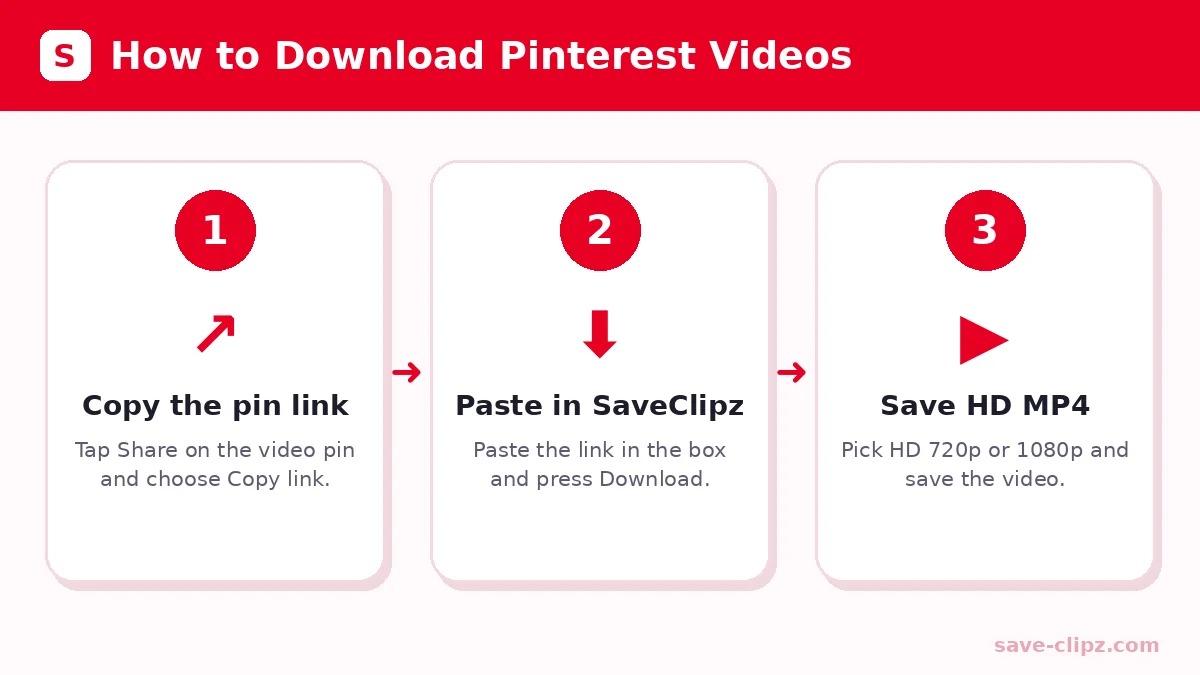
- Copy the pin link. Open the video pin in the Pinterest app or website. Tap the Share button (the arrow icon) and choose Copy link. On a computer you can also copy the address from the browser bar.
- Paste the link here. Come back to SaveClipz and tap Paste, or long-press the box and choose Paste. Then press the red Download button.
- Save the video. In a moment you will see a preview of the pin with download buttons. Pick the quality you want, like HD 720p MP4, and the file will save to your device.
Tip: If the download does not start on your phone, tap Direct link. The video will open in a new tab. Then tap the three-dot menu or long-press the video and choose Download or Save video.
Pinterest Video Download on Android
On Android phones, Chrome saves the MP4 file straight to your Downloads folder. Open the Files app or your Gallery to watch it. If you use Samsung Internet or Firefox, the steps are the same.
Pinterest Video Download on iPhone and iPad
On iPhone, open SaveClipz in Safari. After you tap Download, Safari shows a small download icon at the top. The video goes to the Files app, inside the Downloads folder. Open the video, tap the Share button and choose Save Video to move it to your Photos app.
Pinterest Download Video on PC or Mac
On a computer, Pinterest download video steps are even easier. Copy the URL from the address bar, paste it into SaveClipz and click Download. Your browser will save the MP4 in the Downloads folder. You can play it with any video player, like VLC or the built-in player on Windows and Mac.
Why Use Our Pinterest Downloader?
There are many tools online, but a good Pinterest downloader should be fast, safe and simple. Here is what makes SaveClipz different.
- Totally free. You never pay and there is no daily limit for normal use.
- No sign-up. You do not need a Pinterest account or a SaveClipz account.
- Clean and safe. We do not ask you to install apps or browser add-ons, and we do not show pop-up ads that trick you.
- Works everywhere. It runs in any modern browser on phone, tablet or computer.
- Fast results. Popular links load even faster because we remember them for a few hours.
- All media types. Save videos, images, GIFs and Idea Pins from one place.
Pinterest Video Download HD Quality
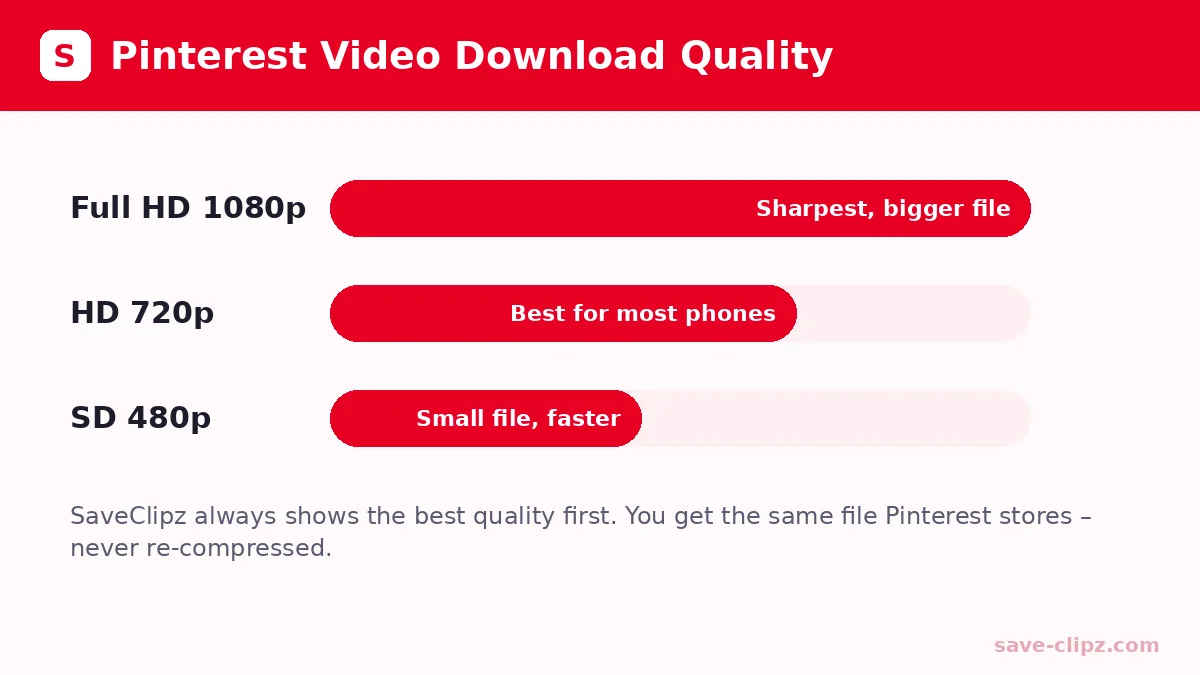
Pinterest stores most videos in more than one size. SaveClipz checks every size and shows you the best one first. For most pins you will get a Pinterest video download HD file in 720p. Some newer pins also have Full HD 1080p. We never shrink or re-compress the video, so the file you get is the same quality Pinterest has.
Pinterest Video Downloader HD with Sound
Our Pinterest video downloader HD option saves the video and its sound together in one MP4 file. You do not need to join audio and video yourself. If a pin has no sound on Pinterest, the downloaded video will also be silent.
Pinterest Video Download Link: pin.it Short Links Work Too
When you share from the Pinterest app, you often get a short link like pin.it/abc123. SaveClipz understands these links. It follows the short Pinterest video download link to the real pin and finds the video for you. Links from country sites like in.pinterest.com, pinterest.co.uk or br.pinterest.com work too.
What Can You Download from Pinterest with SaveClipz?
SaveClipz is more than a video tool. You can use it as an all-in-one Pinterest download helper.
| Content type | What you get | Best page to use |
|---|---|---|
| Videos and reels | MP4 in HD 720p or 1080p | Pinterest Video Downloader |
| Images and photos | Original JPG or PNG in full size | Pinterest Image Downloader |
| Animated GIFs | Original GIF file | Pinterest GIF Downloader |
| Idea Pins and stories | Video or images of the story pin | Pinterest Story Downloader |
Every page uses the same smart tool, so you can paste any pin link on any page. The page only changes which buttons show first.
Download Video Pinterest: Online Tool vs App vs Extension
People download video Pinterest clips in three main ways. Here is a simple comparison so you can choose the right one.
| Method | Pros | Cons |
|---|---|---|
| Online tool (SaveClipz) | Free, nothing to install, works on every device | Needs an internet connection |
| Mobile app | Can feel quick once installed | Takes phone space, many apps show lots of ads and ask for permissions |
| Browser extension | One click on desktop | Works only on computers, some extensions read your browsing data |
For most people an online tool is the safest choice. You keep your phone clean, and you do not give any app access to your photos or contacts.
Download Pinterest Videos Safely and Legally
It is easy to download Pinterest videos, but you should also use them the right way. Pinterest videos belong to the people who made them.
- Personal use is fine. Saving a recipe or workout video to watch offline is normal personal use.
- Ask before you reuse. If you want to post the video on your own page or use it for business, ask the creator first.
- Give credit. When you share someone’s idea, mention their name or Pinterest profile.
- Do not remove notices. Never remove a creator’s logo or watermark from their work.
You can read more about creator rights in Pinterest’s copyright policy. If you are not sure whether a website is safe, you can check it with Google Safe Browsing.
Common Problems and Easy Fixes
Most download problems have a simple fix. Try these steps before you give up.
- “Nothing found” message: The pin may be private, deleted or not a video. Open the link in your browser to check that it still works.
- The video opens instead of downloading: This happens on some phones. Long-press the video and choose Download, or use the Direct link button.
- Wrong link copied: Make sure you copied a pin link (it has /pin/ or pin.it in it), not a board or profile link.
- Too many requests: To keep the tool fast for everyone, we allow a fair number of downloads each minute. Wait one minute and try again.
- Video has no sound: The original pin probably has no sound. Check it on Pinterest first.
Still stuck? Send us the link through our contact page and we will take a look.
How SaveClipz Works Behind the Scenes
Many people wonder how a Pinterest video download online tool can find the video so fast. The idea is simple, and knowing it helps you trust the tool.
- We read the public pin page. When you paste a link, our server opens the same public page that anyone can see on Pinterest.
- We find the video file. Every Pinterest video is stored on Pinterest’s own media servers. We look for that file inside the page.
- We check all sizes. We test the 1080p, 720p and 480p versions and keep the ones that really exist.
- We send it to you. You get a download button for each size. The file comes from Pinterest’s servers, so nothing is changed.
This is why a Pinterest video download by link is safe: we never need your password, and we never touch your Pinterest account.
Who Uses SaveClipz?
A Pinterest video saver is useful for many kinds of people. Here are some common examples:
- Home cooks save recipe videos so they can follow them in the kitchen without internet.
- Students keep short tutorial clips for school projects and study notes.
- Fitness lovers download workout videos to use at the gym, where the signal is weak.
- Travelers save travel ideas before a trip, so they can watch them on a plane.
- DIY and craft fans keep step-by-step videos to pause and replay while they work.
- Small business owners save their own Pinterest videos as a backup.
If you just want to watch a Pinterest video later, saving it with SaveClipz is much easier than searching for the pin again and again.
Tips to Get the Best Quality Every Time
Want the sharpest file from our Pinterest downloader HD option? Follow these simple tips:
- Use the original pin link. Copy the link from the pin itself, not from a screenshot or a re-shared copy.
- Pick the top button. The first download button is always the highest quality we found.
- Use Wi-Fi for long videos. HD files are bigger, so a stable connection helps them finish quickly.
- Do not screen-record. Screen recording lowers quality and can catch notifications. A real Pinterest HD video download gives you the clean original file.
Online Tool vs Screen Recording: Which Is Better?
Some people record their screen to save a pin. It works, but it is not the best way. A Pinterest video downloader online gives you the real file in its full quality, with clear sound and no black bars. Screen recording often adds a lower resolution, a status bar and noise from your phone. It also takes as long as the video itself, while SaveClipz finishes in seconds.
On forums like Reddit, people often ask for a Pinterest video downloader reddit users trust. The answer they usually give is the same: choose a simple web tool that does not ask for an app, a login or your personal data. That is exactly how SaveClipz was built.
Which Pinterest Links Work?
For a smooth Pinterest link video download, make sure you use the right kind of link. Here is a quick guide:
| Link example | Works? | What to do |
|---|---|---|
| pinterest.com/pin/123456789/ | Yes | Paste it directly |
| pin.it/AbCdEf | Yes | Paste it directly |
| in.pinterest.com/pin/123456789/ | Yes | Paste it directly |
| pinterest.com/username/board-name/ | No | Open one pin from the board and copy its link |
| pinterest.com/username/ | No | Open a single video pin and copy its link |
In short, any Pinterest download link that points to one single pin will work.
How to Keep Your Saved Videos Organized
Once you start saving videos, your phone can fill up fast. These easy habits keep everything neat and easy to find.
- Rename your files. Give each video a short name like “pasta-recipe.mp4” so you can search for it later.
- Make folders. Create folders such as Recipes, Workouts or Crafts in your Files or Gallery app.
- Back up important videos. Copy your favorite clips to Google Drive, iCloud or a computer so you never lose them.
- Delete what you do not need. Every few weeks, remove videos you have already used to free up space.
A little care goes a long way. With good folders, your saved Pinterest ideas become your own private library that works even without the internet.
What Is an MP4 File?
MP4 is the most common video format in the world. It keeps good quality while keeping the file size small, and it plays on almost every phone, computer and smart TV. That is why SaveClipz always gives you MP4 files. You can learn more about the format on Wikipedia’s MP4 page.
Pinterest Video Downloader: Frequently Asked Questions
Is SaveClipz free to use?
Yes. SaveClipz is 100% free. There is no sign-up, no trial and no hidden payment.
Do I need a Pinterest account to download videos?
No. You only need the link of a public pin. You do not have to log in to Pinterest or to SaveClipz.
Where are my downloaded Pinterest videos saved?
On Android and computers, videos go to the Downloads folder. On iPhone and iPad, they go to the Files app, and you can then save them to Photos.
Can I download private Pinterest videos?
No. SaveClipz only works with public pins. Private boards, secret pins and deleted pins cannot be downloaded.
What is the best quality I can get?
You get the best quality that Pinterest has for that pin, usually HD 720p and sometimes Full HD 1080p.
Does SaveClipz add a watermark?
No. We do not add any logo or watermark to your files.
Can I download Pinterest videos on iPhone?
Yes. Open SaveClipz in Safari, paste the link and tap Download. The video saves in the Files app.
Does it work with pin.it links?
Yes. Short pin.it links and links from all Pinterest country sites work.
Can I download Pinterest images and GIFs too?
Yes. Use our Pinterest Image Downloader for photos and our Pinterest GIF Downloader for animated GIFs.
Is it safe to use SaveClipz?
Yes. SaveClipz runs in your browser, does not need any app, and does not ask for your personal details.
Is it legal to download Pinterest videos?
Downloading for personal viewing is generally fine. To reuse or repost a video, you should get the creator’s permission.
How many videos can I download in a day?
There is no daily limit. To keep the tool fast for everyone, we only ask you to wait a minute if you send a very large number of links in a short time.
Why does my video open in a new tab instead of downloading?
Some phone browsers play MP4 files instead of saving them. Long-press the video or tap the three-dot menu and choose Download.
Can I download a whole Pinterest board at once?
Not right now. SaveClipz works with one pin at a time. Open each pin from the board and copy its link.
Is SaveClipz connected to Pinterest?
No. SaveClipz is an independent tool and is not affiliated with Pinterest, Inc.
Start Your Pinterest Video Download Now
You now know everything you need. Copy a pin link, paste it in the box at the top of this page and save your favorite Pinterest videos in HD. Want to save photos or GIFs instead? Try our Pinterest Image Downloader, Pinterest GIF Downloader or Pinterest Story Downloader.